
In this post, you will learn how to send every HubSpot and Salesforce pipeline stage change into Twilio Segment as an event, so your retargeting audiences drop people the moment sales starts working them.
Your ad platforms keep retargeting people your sales team is already talking to. The pixel saw a pricing page visit, but it never hears that the lead became an SQL yesterday. Attribution already tracks every lifecycle, lead status, and deal stage change from your CRM and ties it to the visitor who first came in through an ad. Its reverse sync sends those changes back into Twilio Segment as track calls, where Engage audiences and every other destination can use them.
There's no code to write beyond the identify call you likely already have. Everything below is set up in Attribution, Twilio Segment, and the ad platforms.
Prerequisites
To get started you will need:
- A Twilio Segment source on your site or app, connected to the Attribution (Actions) destination with your Attribution Project ID. See the Twilio Segment setup guide.
- HubSpot or Salesforce connected in Attribution. See the HubSpot guide or the Salesforce guide.
- An
identify()call carrying anemailtrait that matches the email on the CRM contact or lead. Both integrations need it to tie anonymous visits to CRM records. - For Salesforce: REST API access (Enterprise, Unlimited, Developer, or Performance Edition) and Lead Status history tracking turned on.
- Segment Reverse - Events turned on. Ask Attribution to enable the bidirectional integration, then add your Twilio Segment write key under Settings › Conversion Integration. The reverse sync setup guide walks through it.
- Twilio Engage with Unify, for Audiences, plus the ad destinations you retarget on.
- Optional: Amplitude or Mixpanel connected to Twilio Segment, if you want to analyze where pipeline stalls.
What are pipeline stage events?
Attribution logs every CRM stage change as its own event on the visitor's timeline, next to their ad clicks, visits, and form fills. Here's what it picks up from each CRM:
| CRM | Stage events | Revenue |
|---|---|---|
| HubSpot | Contact created, every lifecycle stage change (for example Lifecycle Stage: marketingqualifiedlead), every lead status change, and every deal stage transition | Amount on deals marked Closed Won |
| Salesforce | Every lead status change and every opportunity stage change, including Closed/Won | Amount on Closed/Won opportunities |
Once a night, Segment Reverse - Events sends the stage changes back to Twilio Segment as track calls. Each one carries its properties and an Attribution event ID, and is tied to the visitor's user ID. Attribution flags each of these calls so Twilio Segment doesn't send it back into Attribution, which keeps the same stage change from being recorded twice. Once a stage lives in Twilio Segment as an event, any Engage audience or destination can use it. See the Segment Reverse - Events docs.
Keep in mind that these track calls count toward your Twilio Segment plan's volume. With a large CRM, that can add up, so check your MTU (monthly tracked users) limit with Twilio Segment before you turn it on.
How the data flows
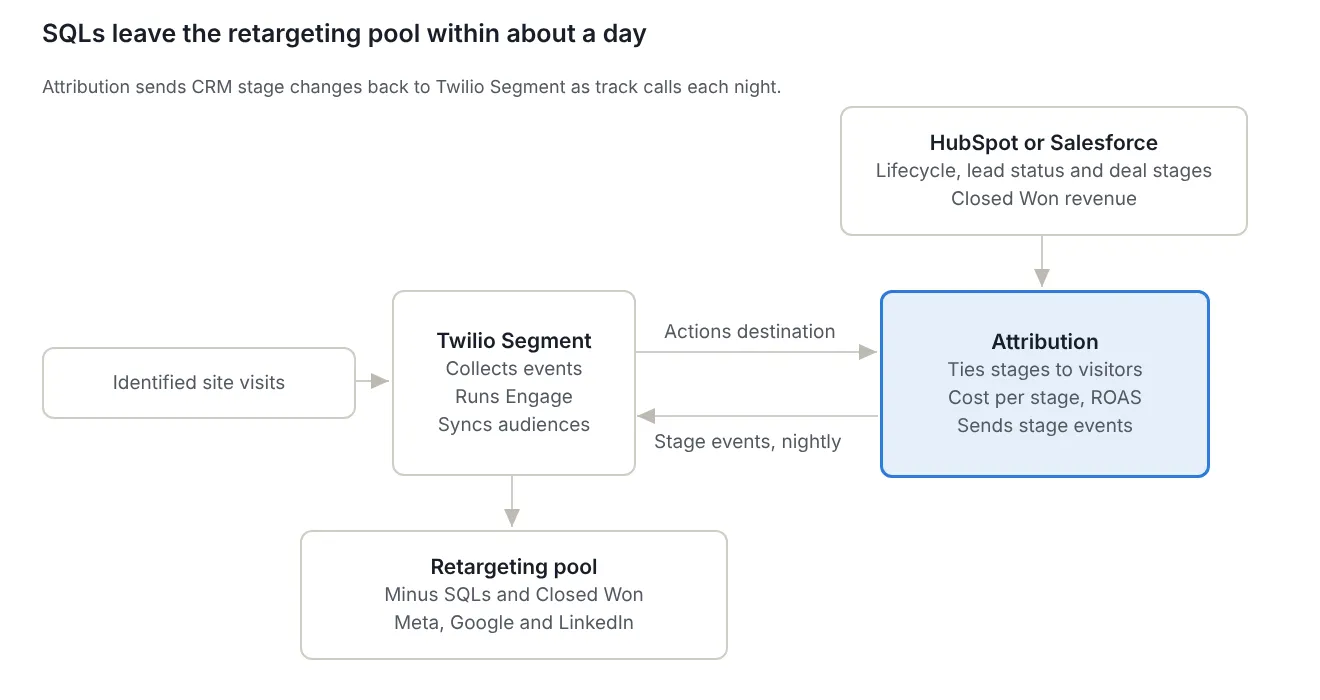
Attribution picks up stage changes from the CRM throughout the day. The reverse sync sends them to Twilio Segment overnight, Engage recomputes the audience, and the ad destinations sync the change, so a new SQL is out of the retargeting pool within about a day. See below for how the pieces connect:
Why use Twilio Segment and Attribution for stage-based audiences
For example, with this setup you can:
- Stop paying to retarget people who are already in a sales conversation.
- Match campaigns to stage. MQLs go into proof-point campaigns, SQLs drop out of retargeting campaigns, and Closed Lost contacts re-enter nurture after 90 days.
- Build every audience from the same stage definitions your sales team uses, instead of guessing from page views.
- Send the same stage events to Amplitude or Mixpanel to see the drop-off between pipeline stages, an approach Attribution's use case examples describe.
- See which channels produce SQLs and Closed Won revenue in Attribution, not just raw lead volume.
Here's how this compares with pixel-based retargeting:
- A pixel audience knows what someone viewed. A stage audience knows where they are in your pipeline.
- A pixel audience keeps an SQL in the pool until the lookback window expires. A stage audience removes them once the stage change syncs.
- Exclusion lists you upload by hand go stale. An Engage audience updates every time a new stage event arrives.
Setting it up
Step 1: Identify visitors with email
Make sure your site calls identify() with the email that ends up on the CRM record, before the form submit creates that record. Attribution matches the email to the HubSpot contact or Salesforce lead, which is what ties a stage change to the ad click that started it.
JavaScript · identify call
analytics.identify('usr_20931', {
  email: 'jordan@example.com'
});
Keep in mind that leads and contacts created by hand, or opportunities that existed before you connected the CRM, show up as Unknown Source in Attribution, because there's no identified visit to tie them to.
Step 2: Connect the CRM in Attribution
For HubSpot, connect your portal in Attribution. Contact creation, lifecycle stage, lead status, and deal stage changes are picked up automatically. See the HubSpot guide.
For Salesforce, turn on Lead Status history tracking first: in Salesforce, go to Setup › Object Manager › Lead › Fields & Relationships, enable Lead History, select Lead Status, and save. Then, in Attribution's Settings, click Connect to Salesforce and sign in. New Salesforce events start showing up in about 15 minutes. See the Salesforce guide.
Step 3: Send stage events to Twilio Segment
In Attribution, go to Settings › Conversion Integration and open Segment Reverse - Events. Under Event names, select All CRM Stage Changes. Set Visitors to send updates for to visitors with a user ID only, since the ad platforms can't match anonymous profiles. Turn on Dry run first, then check the event names in the Twilio Segment source debugger before anything is sent for real.
Here's what a stage change looks like when it lands in Twilio Segment. The values are illustrative; the dry run shows your exact event names and property keys.
JSON · track call
{
  "type": "track",
  "event": "Lifecycle Stage: salesqualifiedlead",
  "userId": "usr_20931",
  "timestamp": "2026-10-13T16:42:00Z",
  "properties": {
    "source": "hubspot",
    "atb_event_id": "evt_7f3c19"
  }
}
Keep in mind that if a destination expects camelCase property keys, turn on Convert property keys to lowerCamelCase in the same settings.
Step 4: Connect the source to Unify
In Twilio Segment, go to Unify › Unify settings and click Profile sources. Click + Connect source and choose the source that holds the write key you added in Attribution. The stage events then land on the same profiles as your own events, matched by user ID, next to each person's email.
Step 5: Build stage audiences in Engage
In Engage › Audiences, create the retargeting pool: people who performed your pricing page event in the last 30 days, and who have not performed Lifecycle Stage: salesqualifiedlead or your Closed Won deal stage event. Use the exact event names from the dry run.
A few other stage audiences worth building from the same events:
- MQL proof-point pool: performed the MQL lifecycle stage event, and not the SQL event.
- Closed Lost nurture: performed a Closed Lost stage event more than 90 days ago, and nothing since.
- Customer suppression: performed a Closed Won stage event at any time, excluded from all prospecting.
Step 6: Connect the ad destinations
Add Facebook Custom Audiences (Actions) as a destination on the audience. An admin on the Meta ad account authorizes the connection. In the Sync Audience action, map External ID to your user ID, plus email. Leave Sync Mode on Mirror so people are removed from the Meta list when they leave the audience, without a separate remove step. See the Facebook Custom Audiences docs.
For Google, add Google Ads Conversions and use the Customer Match User List action, with Send Track on and Send Identify off in the audience's destination settings. Set both consent fields, since Google rejects users sent as DENIED. See the Google Ads Conversions docs. Add LinkedIn the same way if you retarget there.
Step 7: Send stages to product analytics (Optional)
Connect Amplitude or Mixpanel to the same Twilio Segment source. The stage events arrive with the rest of each person's activity, so you can build a funnel from first visit to Closed Won and see where pipeline stalls.
What to do next
Now your retargeting follows your pipeline, and sales-qualified leads drop out on their own. Next, build the reverse audience: contacts who hit Closed Lost more than 90 days ago go back into a nurture campaign.
Then, in Attribution, create a saved view with your SQL stage event as the conversion, so you can see which channels produce SQLs separately from raw lead volume. Cost per SQL uses the click costs Attribution pulls from your ad platforms, or spend you enter manually for platforms that aren't connected. Switch the conversion to Closed Won to see ROAS on real revenue. You can also ask Claude, connected through the Attribution MCP server, which channels drove the most SQLs last quarter. We can't wait to see what your sales team does with the time it used to spend on leads your campaigns kept chasing.

