
In this post, you will learn how to build Meta and Google lookalike audiences from your most valuable customers, using the lifetime value Attribution calculates after acquisition cost.
Most lookalike seeds are built from every purchaser. Many of those buyers ordered once, often on a discount, and never came back, so Meta and Google learn to find more people like them. A seed of your highest-value customers points the platforms at the new customers you actually want. Attribution knows what each customer has spent and what it cost to acquire them. The reverse sync sends that into Twilio Segment as profile traits, Engage turns those traits into audiences, and Twilio Segment syncs the audiences to Meta and Google as lookalike seeds and prospecting exclusions.
There's no code to write. Everything below is set up in Attribution, Twilio Segment and the two ad platforms.
Prerequisites
To get started you will need:
- A Twilio Segment source on your site or app, connected to the Attribution (Actions) destination with your Attribution Project ID. See the Twilio Segment setup guide.
- Google Ads and Meta Ads connected in Attribution, so click costs are tied to each visitor. An admin on each ad account authorizes the connection. For a platform that isn't connected, you can enter its spend manually in Attribution. See the ad integrations overview.
- Segment Reverse - Identity turned on. Ask Attribution to enable the bidirectional integration, then add your Twilio Segment write key under Settings › Conversion Integration. The reverse sync setup guide walks through it.
- Twilio Engage with Unify, for Audiences.
- The Facebook Custom Audiences (Actions) and Google Ads Conversions destinations in Twilio Segment, each authorized by an admin on the matching ad account.
- Your own identify calls carrying a user ID plus email or phone, so the ad platforms can match people.
- Optional: Costs beyond ad clicks, like agency or SEO fees, imported into Attribution with the spend upload, for a fuller cost per customer.
What is LTV after acquisition cost?
Attribution's LTV trait is a literal customer lifetime value: everything the customer has spent, minus every acquisition cost Attribution knows about. That includes every paid click on their path, not just the last one, plus any non-paid costs you import, like agency or SEO fees.
Worked example
| Google ad click | $2.50 |
| Meta ad click | $1.40 |
| Acquisition cost | $3.90 |
| First purchase | $100.00 |
| LTV after first purchase | $96.10 |
| Two more purchases of $100 | +$200.00 |
| LTV today | $296.10 |
Most brands focus on the paid side, since that's where acquisition cost is easiest to see. Organic and direct customers carry no click cost, so their LTV is their revenue unless you import the costs behind those channels.
Each night the reverse sync writes LTV and the other traits you pick onto the Twilio Segment profile as an identify call, prefixed atb_. An Engage audience built on those traits updates as the numbers change, and the destinations push its membership to Meta and Google. See the reverse sync overview.
The traits that matter for lookalikes are below. The full list is in the docs.
| Trait | What it holds | Use it for |
|---|---|---|
| LTV | Lifetime revenue minus every acquisition cost Attribution knows about | The seed threshold |
| Cost of Clicks | Total cost of every paid click on the customer's path | Spotting customers who cost more than they return |
| Purchase Count | Number of revenue conversions | The suppression list |
| Repeat Purchase | Whether the customer bought more than once | Narrowing the seed to repeat buyers |
| Last Conversion Google Attributed LTV | Revenue credited to Google minus the Google click cost, as of the latest conversion | Google-only seeds |
Attribution's use case examples describe this exact pattern: a lookalike built from the highest-LTV customers, with LTV based on both revenue and paid advertising cost.
How the data flows
Click costs come straight from the ad platforms, or from spend you enter manually in Attribution for platforms that aren't connected. Purchases arrive through Twilio Segment, and the LTV traits return to Twilio Segment overnight to drive the seed and suppression audiences. See below for how the pieces connect:
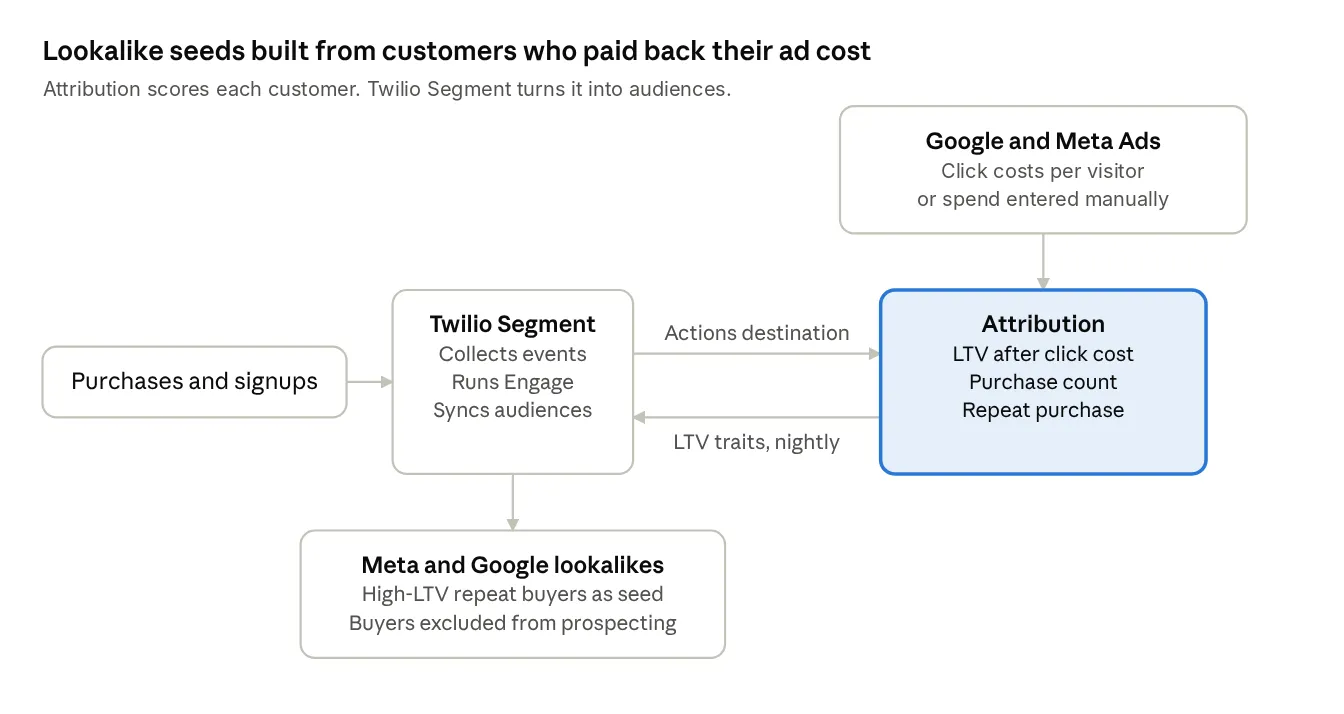
Why use Twilio Segment and Attribution for lookalikes
For example, with this setup you can:
- Seed on value after acquisition cost. Order count alone can't show that.
- Drop customers whose acquisition cost outran their revenue from the seed automatically.
- Feed both platforms from one audience definition, and change it once in Engage.
- Build suppression lists from the same traits, so prospecting stops paying for people who already bought.
- Import agency, SEO or other fees so the cost side reflects what each customer really cost, not just clicks.
Here's how this compares with a standard purchaser seed:
- A purchaser seed weights everyone who bought equally. An LTV seed only includes customers above your value line.
- A purchaser seed is a snapshot you re-upload. An Engage audience updates as the traits change.
- A purchaser seed ignores what you paid to acquire each customer. An LTV seed subtracts it.
Setting it up
Step 1: Pick the traits
In Attribution, go to Settings › Conversion Integration and open Segment Reverse - Identity. Select LTV, Cost of Clicks, Purchase Count, Repeat Purchase and Last Conversion Google Attributed LTV. Send them for visitors with a user ID only, since the ad platforms can't match anonymous profiles. Turn on the dry run first to confirm the exact trait keys before anything is sent.
Here's what the nightly identify call from Attribution looks like on a profile, using the worked example above. The values are illustrative; the dry run shows your exact keys.
JSON · identify call
{
  "type": "identify",
  "userId": "cus_48213",
  "traits": {
    "atb_ltv": 296.10,
    "atb_cost_of_clicks": 3.90,
    "atb_purchase_count": 3,
    "atb_repeat_purchase": true,
    "atb_first_touch_channel_name": "Google Ads",
    "atb_last_conversion_google_attributed_ltv": 118.40
  }
}
Step 2: Connect the source to Unify
In Twilio Segment, go to Unify › Unify settings and click Profile sources. Click + Connect source and choose the source that holds the write key you added in Attribution. Its identify calls then land on the same profiles as your own, matched by user ID, so the atb_ traits sit next to each customer's email and phone.
Step 3: Build the seed audience
In Engage › Audiences, create a new audience from customer traits: atb_repeat_purchase equals true and atb_ltv is greater than the line you'd call a good customer. Two times your average order value is a reasonable place to start.
Keep in mind that Meta needs at least 100 people from one country to build a lookalike. Brands running Twilio Segment and Attribution together usually clear that easily, but check the audience size before you connect destinations. If it's small, drop the repeat-purchase condition or lower the LTV line.
Step 4: Send it to Meta
Add Facebook Custom Audiences (Actions) as a destination on the audience. An admin on the Meta ad account authorizes the connection, and the ad account needs to belong to a Meta Business account. In the Sync Audience action, map External ID to your user ID, plus email and phone. Twilio Segment hashes them before they're sent.
Leave Sync Mode on Mirror so the Meta list adds and removes people as the audience changes. Then, in Ads Manager, create a lookalike from that custom audience. See the Facebook Custom Audiences docs.
Step 5: Send it to Google
Add Google Ads Conversions to the same audience. An admin on the Google Ads account signs in to authorize it, and you set your Customer ID. In the audience's destination settings, turn off Send Identify and turn on Send Track, since the Customer Match User List action listens for Audience Entered and Audience Exited events.
Map email and phone, and set Ad User Data Consent State and Ad Personalization Consent State. Google rejects any user sent as DENIED. Use the list as the seed for a Demand Gen lookalike segment, or as an audience signal in Performance Max. See the Google Ads Conversions docs.
Keep in mind that Google Ads has its own Customer Match eligibility requirements for the account. Check them before you rely on the list.
Step 6: Build the suppression list
Create a second audience where atb_purchase_count is greater than or equal to 1. Connect it to both destinations the same way, then add it as an exclusion on your prospecting campaigns and ad sets.
What to do next
Now your lookalikes are seeded with customers who were worth acquiring, and they keep themselves up to date as Attribution's numbers change. Run the old seed and the new one side by side for 30 days, each in its own campaign or ad set.
Then open the First Time Purchasers report in Attribution and expand the Meta and Google rows down to those campaigns. It splits first-time and repeat revenue and conversions against spend, so you can see which seed brings in more new customers for the money, and which of those customers come back. You can also ask Claude, connected through the Attribution MCP server, to pull the same comparison for you. Keep the winner and revisit the LTV line every quarter. We can't wait to see who your best customers help you find.
Further reading
- Attribution: Twilio Segment reverse sync, Connecting & Setup, Available Data
- Attribution: Use case examples
- Attribution: First Time Purchasers
- Attribution: Upload spend for a filter
- Twilio Segment: Unify onboarding guide
- Twilio Segment: Facebook Custom Audiences (Actions), GA announcement
- Twilio Segment: Google Ads Conversions

